

It's no secret that Zoom has grown beyond video meetings into voice, with Zoom Phone and Zoom Contact Center.
In the unified communications as a service (UCaaS) and contact center as a service (CCaaS) markets, Zoom is now a mainstay. Gartner recognizes it as a leader in both categories.
With both enterprise customers and small businesses on its books, Zoom is now dealing with complex global requirements across the entire telecoms estate.
Planning global voice for Zoom rollouts can be one of the most challenging parts of a deployment, and it's the focus of this blog post. But first, let's look at the background behind Zoom's global enterprise communications growth.
Zoom's Evolving Ecosystem
Zoom became the video conferencing tool of choice during the coronavirus pandemic, but its portfolio now includes contact center functionality, its own email product, and even its own word processor.
Some businesses now choose Zoom over Microsoft and Google as their single provider for all communications and collaboration services.
Traditional enterprise communication use cases
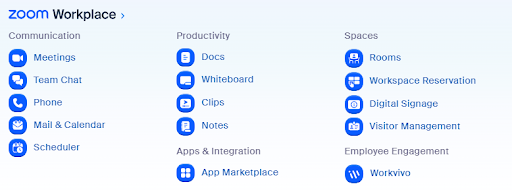
The rebranded Zoom Workplace portfolio now covers a wide range of collaboration functionality:
- Meetings
- Team Chat
- Phone (UCaaS)
- Mail & Calendar
- Scheduler
- Documents
- Whiteboard
- Clips (asynchronous video)
- Notes
- Rooms
- Workspace Reservation
- Digital Signage
- Visitor Management
- App Marketplace
- Employee Engagement
This wider portfolio brings Zoom into new buying conversations. While most existing customers use Zoom Meetings as their primary product, more than seven million users now use Zoom Phone too, and their requirements are more complex.
Zoom is now a fully-fledged UCaaS and VoIP phone provider, billing for phone licenses, calling minutes, and even meeting room real estate. The use case has moved from online meetings to a single provider for internal communications and external calling.
Then there's also the CCaaS feature set to consider…
Zoom's expansion into CCaaS
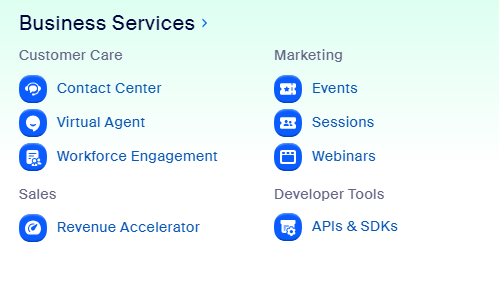
Zoom's "Business Services" portfolio includes the products that serve external customers.
The portfolio includes:
- Contact Center
- Virtual Agent (AI-powered self-service)
- Workforce Engagement
- Events
- Sessions
- Webinars
- Revenue Accelerator
- APIs and SDKs
While running online events remains somewhat popular, it's the contact center side of this portfolio that's really taken off.
In May 2024, Zoom reported a 246% year-over-year increase in Zoom Contact Center deals worth more than $100,000 in annual recurring revenue.
This is partly due to the rise in popularity of multichannel customer service.
UCaaS and CCaaS as One?
With both UCaaS and CCaaS products, Zoom lets contact center agents work in a single app, so they switch between apps less often during the day.
Enterprises are now looking at the benefits of a single provider for both their contact center and business communications needs. (Some industry influencers call this combination of UCaaS and CCaaS on a single platform 'MultiCaaS'.)
Combining these standalone tools into one platform, alongside Zoom's broad contact center portfolio, gives Zoom support for these communication channels:
- Internal comms (UCaaS)
- Voice
- Video
- SMS
- Web Chat
- Meta Messaging

With these options to extend customer experience, combined with its extensive collaboration portfolio, more organizations are considering Zoom for CCaaS.
Voice Connectivity Options for Zoom
When rolling out a new CCaaS platform, however, it's important to get the core things right, and nothing is more core to the contact center than voice. You need to get voice connectivity right up front. The right voice solution can strengthen your global sales and service capabilities. Changing it mid-project often means downtime and reworked processes.
Let's explore the voice connectivity options for Zoom Phone and Zoom Contact Center.
There are three voice connectivity options for Zoom:
- Zoom native calling
- Zoom's carrier program
- Third-party carriers with integrations
1. Zoom native calling
If you're going all-in on Zoom (Phone and Contact Center), your first option is for Zoom to provide voice connectivity. This means you have a single bill for your UCaaS and CCaaS infrastructure and a unified SLA.
Benefits of Zoom's native calling
- Single bill for voice and contact center
- Global, trusted brand
- Benefit from bundled pricing
- Unified SLA for voice and contact center
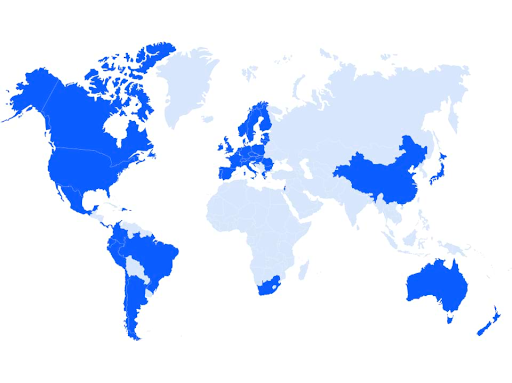
Zoom Phone, Zoom's cloud phone system, provides domestic PSTN calling in 45 countries, with some restrictions to note.
For example, in Australia and China, Zoom can only provide metered calling. Emergency services dialing is also not supported in these locations.
Here is a list of the countries where Zoom fully supports native calling.
| North America | Latin America | EMEA | Asia-Pacific |
|---|---|---|---|
| United States (including Puerto Rico), Canada | Argentina, Brazil, Chile, Colombia, Costa Rica, Ecuador, Mexico, Panama, Peru | Austria, Belgium, Bulgaria, Croatia, Cyprus, Czech Republic, Denmark, Estonia, Finland, France, Germany, Greece, Hungary, Ireland, Israel, Italy, Latvia, Lithuania, Luxembourg, Netherlands, Norway, Poland, Portugal, Romania, Slovakia, Slovenia, South Africa, Spain, Sweden, Switzerland, United Kingdom | Hong Kong SAR, New Zealand, Singapore |
2. Zoom's carrier program
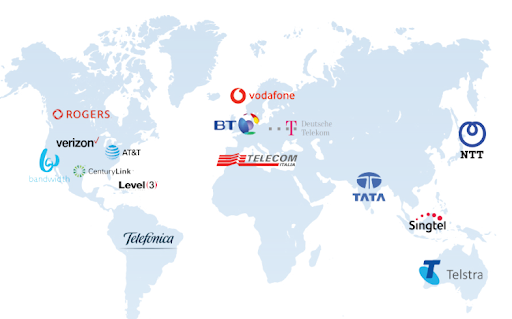
The bring-your-own-carrier (BYOC) program opens up global voice options for Zoom. Like Microsoft's Operator Connect program, it lets customers keep their existing calling provider.
Supported providers include:
- Rogers
- Verizon
- Telstra
- BT
- Bandwidth
- AT&T
- CenturyLink
- Telefonica
- Vodafone
- T-Mobile (Deutsche Telekom)
- Telecom Italia
- Tata
- Singtel
- NTT
Choosing this route for global voice for Zoom means you keep existing call discounts and bundles while getting Zoom's CCaaS features.
You can connect your carrier via the public cloud or private cloud. Administration happens in the Zoom admin center, and supplier portals remain available.
3. Third-party carriers with integrations
For countries not supported, or not fully supported, by Zoom or its carrier program, choose a third-party carrier with a certified integration for Zoom.
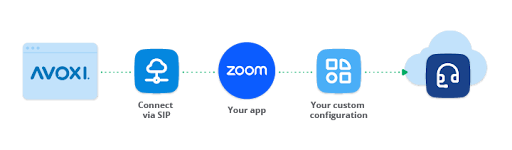
SIP forwarding between Zoom's cloud infrastructure and the third party creates a direct connection between the voice provider and Zoom.
Using such a carrier gives you global support in regions that native calling and the Zoom carrier program can't reach.
Without the help of a third party, options are limited to:
- Not using Zoom Contact Center.
- Configuring expensive, unsupported calling plans.
- Creating a workaround that hops between countries, introducing unnecessary performance issues.
Choosing the Right Voice Solution for Your Zoom Setup
To make the right choice for your Zoom voice connectivity, there are three major criteria in play:
- Size and global reach: Large businesses with complex routing requirements across multiple countries may need to assess how they can most efficiently meet their coverage needs. Small, single-location businesses are often best suited to native calling if Zoom covers their locations.
- Balancing cost and functionality: The most economical solution may restrict plans for expansion and the types of customer experiences you can provide.
- Importance of scalability and flexibility: If you hire remote employees, acquire a business in a new location, or open a new office, you need to add "more of the same" rather than buy a new standalone solution that's disconnected from the rest of your business.
AVOXI's Integration with Zoom
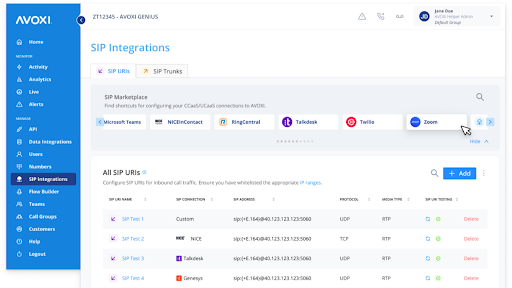
SIP forwarding to Zoom gives companies a simple way to use AVOXI's global voice coverage and consistent call quality while operating out of their Zoom environment.
AVOXI's Integration with Zoom
SIP forwarding to Zoom gives companies a simple way to use AVOXI's global voice coverage and consistent call quality while operating out of their Zoom environment.
You can now route and receive external calls from over 150 countries to any SIP-enabled application.
AVOXI provides voice connectivity for Zoom in all the countries detailed here.
Beyond coverage, AVOXI voice connectivity gives Zoom users:
- Month-to-month contracts with no long-term commitments.
- Competitive pricing, even in hard-to-reach locations.
- Flexible voice bundles based on usage volume.
- Built-in fraud monitoring.
- Real-time traffic metrics.
- 24/7 customer support.
- Automatic failover.
Zoom customers can use AVOXI's established network of tier-one carriers for redundant, high-quality voice call routing. You gain access to an expanded global network without managing multiple carriers.
AVOXI's long-term relationships with carriers in local markets help you get the best possible rates. Our integration with Zoom means setup is simple and fully managed end-to-end.
Use Cases for AVOXI's Zoom Integration
Enterprise communications
Generally, the larger the business, the more calls you make both internally and externally.
Internally, these may be on-net or via different landlines to colleagues in different offices or countries. Consolidating internal calling onto the same global network can drive significant quality improvements and cost savings when you're making calls at scale.
Externally, every telecom issue and call comes with a resource or financial cost. With a single provider like AVOXI managing your global voice, you can streamline these costs and minimize troubleshooting for enterprise users.
Sales teams
Global sales teams need to call prospects and customers all over the world. There can't be restrictions on when and how teams make calls. Restrictions would put the entire sales process at risk, and both productivity and revenue would suffer.
To build as much trust with prospects and customers as possible, sales teams need outbound calling features like caller ID that works in the locations they're prospecting. They also need support for each country's restrictions. Even a small mismatch can stall the sales process.
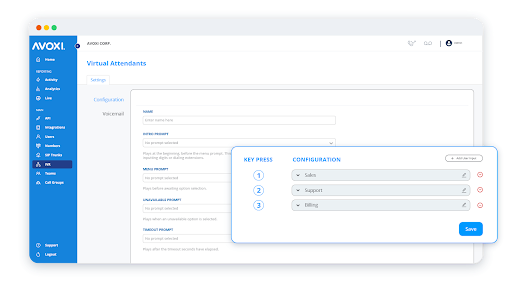
When on calls, or when receiving inbound callbacks, you can't overstate the importance of premium call quality. This covers clear audio and stable connections (regardless of the distance between caller and salesperson), as well as support for the full set of contact center features like auto attendant (IVR), automatic queue callbacks, and custom routing.
Contact centers and expert use cases
SIP forwarding is a more affordable option for inbound call forwarding because you aren't charged the typical PSTN or mobile termination rates. This makes AVOXI's third-party integration for Zoom particularly useful for small businesses.
It also suits occasional contact center needs. You only pay for bundles based on usage, on a month-to-month basis, so there are no upfront charges or long-term contracts.
If you need to add more contact center agents for seasonal peaks, the voice network is ready to scale with you.

Key Features of AVOXI's Zoom Integration
AVOXI offers two-way voice services in many countries around the world. Some countries support local caller ID for in-country services; others suit international caller ID service.
- With SIP trunking capabilities including high-quality voice, automatic failover, and international coverage, you're well placed for global rollouts at scale. You get unlimited concurrent calling, so you don't pay per SIP channel.
- AVOXI gives you access to a global phone number inventory. Add new and manage existing connections from a single platform.
- International compliance comes as standard, backed by AVOXI's global partnerships, testing, and interoperability in every country.
- Complement Zoom Contact Center reporting with call analytics and reporting tools, including MOS scoring, jitter, packet loss, and quality of service.
Getting Started with AVOXI for Zoom
If you're implementing Zoom Contact Center and need global coverage, getting integrated with AVOXI is simple.
First, we'll book time with our dedicated voice team to plan your requirements. If we're a good mutual fit, onboarding starts with gathering technical and business needs and creating a network diagram for your future state.
From there, it's all about numbers and connectivity. With a little input from you, we'll prepare the service for your go-live date.
We're all about global quality. That's global coverage and consistent quality across all your regions.
With coverage in over 150 countries, if you've been there, we've probably made a call there.
Ready to take Zoom Contact Center global? Learn more about our Zoom integration here.

You Might Also Be Interested in


Your AI Stack Is Only as Good as Your Voice Layer: A Guide for IT Directors

Need Help Getting US Phone Numbers?
We're here to help! Contact us today so we can help find the right business phone number for you.